 • 6 min read
Ship Your Toolchain, Not Just Infrastructure

Platform teams deliver Terraform modules via registries or via direct repository reference, Kubernetes’ custom resources through the cluster, and internal UIs via deployment pipelines. But for their daily work, product teams need CLI tools and custom configurations. Those ship as wiki pages and Slack announcements.
“Please update your kubectl.” ~ In some Slack channel right now
Devenv closes that gap: it turns platform tooling into declarative, version-controlled environments that teams consume with a single command. It’s knolling: by the platform team, for the product team.
The core problem is not only the delivery mechanism: Platform teams must also control which tool versions their consumers run: kubectl, the AWS CLI, OpenSSL. When the version is wrong the friction becomes expensive.
OpenSSL: Version Drift in the Fields
In a previous project, cluster access required hand-rolling certificate signing requests with OpenSSL and getting them signed by a Kubernetes admin. Scripts and docs existed, but the wrong OpenSSL version produced incompatible certs, even catched by checks in the scripts.
Another example is that a kubectl version can and will complain if the version skew between the client and the server is too large.
Devenv: Nix Without the Sharp Edges
I discovered Nix in 2015 while founding Briends GmbH. Nix provides more than just a deterministic development shell. It has a strong ecosystem for providing a reproducible environment, but it has some sharp edges and a steep learning curve.
Built on top of Nix, devenv provides a declarative and specialized way to define and distribute complete development environments, including all the tools, scripts, and configurations that teams need.
Devenv allows platform engineering teams to:
- Version-lock all tools: Ensure every developer uses the same version of
kubectl,terraform,aws-cli, or any other tool, eliminating version skew warnings or even breaking issues - Ship custom scripts and tooling: Distribute platform-specific scripts, helpers, and automation alongside the standard tooling
- Provide reproducible environments: Guarantee that what works on one machine works on all machines, mostly regardless of the underlying operating system (Nix is still platform dependent because it provides true native executables)
Unlike Docker-based development environments that require running containers, devenv integrates directly into the developer’s shell, providing a native experience while maintaining reproducibility. The tools are available in the PATH just as if they were installed globally on the system, but they’re actually scoped to the active shell, and version-controlled.
Platform as a devenv Module
Here’s a minimal platform environment:
platform-env
├── devenv.nix
├── devenv.lock
└── modules
    ├── google-cloud.nix
    └── scripts
└── gcp-costs.sh{
pkgs,
lib,
...
}: {
imports = [
./modules/google-cloud.nix # Parameterized optional configuration
];
config = {
packages = [ pkgs.k9s ]; # Always provided
};
}A devenv module can define options that configure the effective devenv configuration, including specific packages and configuring services such as Cloud SQL Auth Proxy or shell start-up tasks.
Below, we offer a kubernetesNamespace option for consumers, which will be used to set their namespace in their Kubernetes context on shell activation.
{ pkgs, lib, config, ... }:
let
  cfg = config.google-cloud; # Alias
  clusterName = "your-platform-cluster";
  clusterRegion = "europe-north1";
  clusterProjectId = "gcpId01234";

  # Devenv provides a .devenv state directory as a persistence layer
  stateDirectory = "${config.devenv.state}/google-cloud";
  # Isolate platform kubernetes configuration from user-scoped
  # Will be used get-credentials to store credentials and
  # will be defined as the KUBECONFIG env below
  kubernetesConfig = "${stateDirectory}/kubeconfig.yaml";
in {
  # OPTIONS: What can be configured (the API)
  options.google-cloud = {
    enable = lib.mkEnableOption "google-cloud";
    kubernetesNamespace = lib.mkOption {
      type = lib.types.str;
      description = "Namespace of the consumer";
    };
  };

  # CONFIG: What happens when enabled
  config = lib.mkIf cfg.enable {
    packages = [
      pkgs.google-cloud-sdk
      pkgs.kubectl
       # Manages kubernetes auth with gcloud auth login credentials
      pkgs.gke-gcloud-auth-plugin
      # Additional tools you might use with your cluster
      pkgs.google-cloud-sql-proxy
      pkgs.kustomize
      pkgs.cmctl
      pkgs.helm
    ];

    env = {
      USE_GKE_GCLOUD_AUTH_PLUGIN = "true";
      KUBECONFIG = kubernetesConfig;
    };

    tasks."google-cloud:get-kubernetes-credentials" = {
      # gcloud will store credentials in KUBECONFIG
      # but `env` definition has no effect until devenv:enterShell
      exec = ''
        export KUBECONFIG=${kubernetesConfig}
        gcloud container clusters \
          get-credentials ${clusterName} \
          --region ${clusterRegion} \
          --project ${clusterProjectId}
        kubectl config set-context --current --namespace=${cfg.kubernetesNamespace}
      '';
      # Execute Task before being dropped into shell
      before = [
        "devenv:enterShell"
      ];
    };

    # Include script for all consumers
    scripts.gcp-costs-analyzer.exec = ./scripts/gcp-costs.sh;
  };
}
Additionally, this module provides essential tools like kubectl, whose version devenv.lock pins. The gke-gcloud-auth-plugin is particularly valuable; it provides IAM-based auth to the kubernetes cluster with zero friction.
Consumption
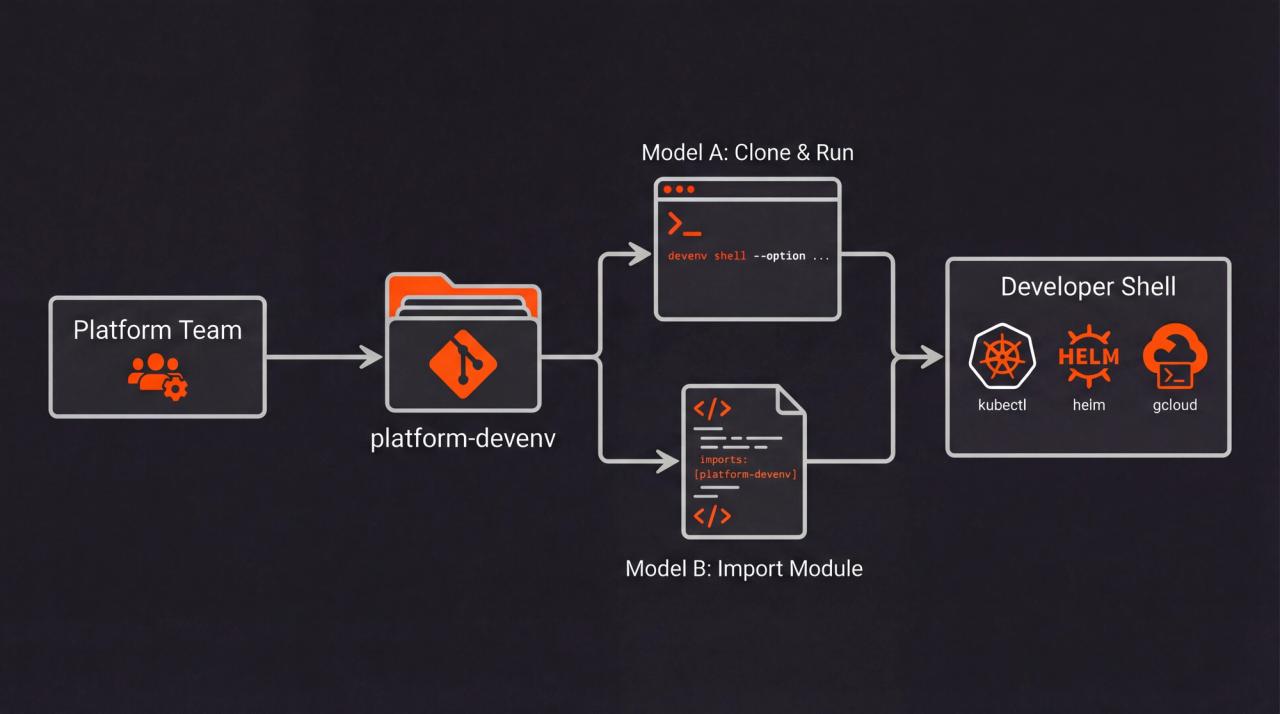
Consuming teams install just two things: Nix and devenv. They don’t even need to understand the Nix language used by devenv. They can check out your infrastructure environment repository and drop their workspaces into this environment. If they decided to use devenv for their projects as well, they can compose the platform devenv with theirs.
Model A: Zero Nix Knowledge
In this model, developers simply clone the platform repository and invoke devenv with command-line options. Consumers don't need to write any Nix code or even understand the module system, they just pass configuration values as flags:
# Clone the platform devenv
git clone git@github.com:your-org/platform-devenv.git
cd platform-devenv

devenv shell \
  --option google-cloud.enable:bool true \
  --option google-cloud.kubernetesNamespace:string "aperture-science"
# Or auto-activate with a direnv setup (out of scope, see References)

# Done. All tools available.
kubectl version
helm version
Now they can drop their project directories into platform-devenv/workspace/, which you can add to the platform-devenv/.gitignore. All their custom tools can blindly assume that the tools required and provided by the platform are available. No more shell checks required in this regard.
To even shorten the devenv shell invocation, you can use the .env integration.
Model B: Integrated into Consumer’s Devenv Definition
For teams already using devenv, they can import your modules into their own setup:
inputs:
  platform-devenv:
    url: github:your-org/platform-devenv # SSH access has to be configured
    flake: false  # Import as source, not as flake
imports:
  - platform-devenv  # Imports all modules
Then configure in their devenv.nix:
{
  google-cloud = {
    enable = true;
    kubernetesNamespace = "aperture-science";
  };
}
This simplifies the devenv shell invocation and is the preferred way for many configurable options.
Caveats
Several trade-offs come with this approach:
Learning Curve for Platform Teams: While consumers don’t need deep Nix knowledge, the platform team maintaining the devenv.nix modules needs to understand the Nix language and devenv’s module system. Debugging can be challenging in Nix.
Initial Setup Overhead: Developers need to install Nix and devenv on their machines, which can be a hurdle in organizations with strict security policies or locked-down systems.
Build Performance: The first time a developer enters a devenv shell, Nix may need to download and build various dependencies, which can take significant time (1-20+ minutes) depending on the complexity of the environment. This can be mitigated through:
- Avoiding the bleeding edge rolling package channel (called unstable) of nixpkgs/Devenv to utilize the official binary cache of the Nix ecosystem
- Setting up an S3-compatible storage to store the binary cache that your organization controls, especially when using compile-intensive custom tools
- Using caching services like Cachix (the company behind devenv)
- Manually transferring Nix stores via SSH, archive, or other community tools to serve the binary cache
For platform teams, investing in a shared binary cache is highly recommended to ensure developers aren’t repeatedly building the same packages.
What Else Can You Ship?
Ideas for what a platform team can ship beyond this example:
- Notify the user in the shell that a new
platform-devenvversion is available, or even auto-update - Integrate own security & compliance checks as git hooks (e.g., via trivy)
- Onboarding scripts that automate account creation or guide through the manual setup (do-nothing script)
- Curate & Inject coding agent skills by creating those files on shell invocation
Conclusion
The reproducible, declarative environment pays off: one definition replaces dozens of wiki pages, and manual checklists and missed announcements.
This setup allows the platform engineering team to treat their platform tooling as deliverable, version-controlled software, which is consumable and configurable by other teams. The direct configuration in a devenv.nix doesn't have as steep a learning curve as a custom Nix setup.
References
- Example for a full platform-devenv (Reference in time of writing)
- Automatic Shell Activation via direnv